 By Ava Walters
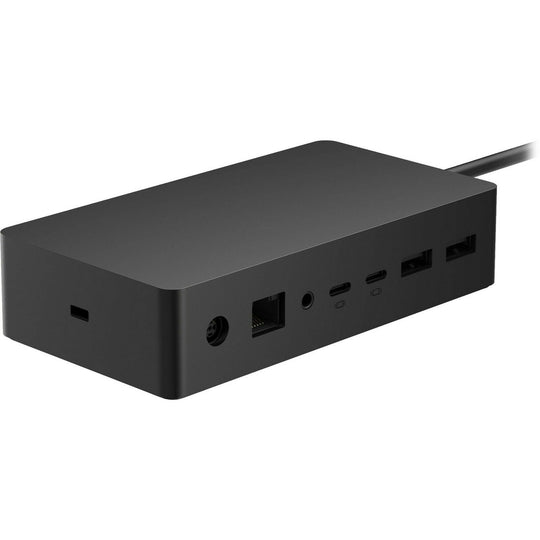
The modern workspace is evolving rapidly, and keeping up with its demands requires innovative tools and technology. One such tool that has become indispensable for professionals is the Microsoft Surface Laptop Docking Station. This device transforms a portable laptop into a powerful desktop workstation, offering enhanced productivity and convenience. By integrating multiple peripherals through a single device, it allows users to streamline their workflow and maintain an organized workspace.
Benefits of Using a Docking Station
Utilizing a docking station with a Microsoft Surface Laptop offers numerous advantages:
- Expanded Connectivity: With multiple ports, including USB, HDMI, and Ethernet, a docking station ensures seamless connectivity with various devices and networks.
- Enhanced Display Capabilities: Connect to multiple monitors for a larger visual workspace, which is ideal for multitasking and complex projects.
- Improved Ergonomics: A docking station allows for an ergonomic setup, reducing strain on the user’s eyes, neck, and back.
- Efficient Power Management: Charge laptops and connected devices simultaneously through the docking station, ensuring devices are always ready for use.
- Organized Workspace: Minimize cable clutter by connecting peripherals through a single docking station, creating a neat and tidy work environment.
Choosing the Right Docking Station
Selecting the ideal docking station involves considering specific requirements and compatibility. Here are a few factors to evaluate:
Compatibility and Ports
Ensure that the docking station is compatible with the specific model of the Microsoft Surface Laptop. It’s essential to verify that the station includes the necessary ports to connect all required devices. Consider future needs as well, such as additional monitors or external drives.
Power Delivery
Power delivery is crucial for maintaining the device’s battery life and ensuring fast charging capabilities. Opt for a docking station that provides sufficient power output to support the laptop and other connected devices.
Setting Up a Docking Station
Once the ideal docking station is selected, setting it up efficiently is key to maximizing its benefits:
- Positioning: Place the docking station in a location that allows easy access to ports and maintains a tidy workspace.
- Connection: Connect all necessary peripherals, such as keyboards, mice, and monitors, ensuring that each device functions correctly.
- Configuration: Configure display settings and network connections to ensure smooth operation and optimal performance.
- Testing: Test each component to confirm that the setup meets all operational requirements and is free of connectivity issues.
Conclusion
A Microsoft Surface Laptop Docking Station is a valuable addition to any professional setup, enhancing productivity and functionality. By understanding its benefits and how to choose and set up the right station, users can fully leverage their microsoft surface laptop docking station to create an efficient and effective work environment. Embracing such technology is essential for staying ahead in today?s fast-paced world.